What Happens to SSH Sessions When the Lid Closes
Three distinct failure modes—and their fixes—explain why SSH sessions die when laptops sleep.
A closed laptop lid does not kill an SSH session in one stroke. It triggers a sequence of up to three distinct failure modes, each with its own cause, its own timing, and its own fix, and they can fire in order or alone.
The confusion starts with the symptom. A frozen terminal followed by a message like "client_loop: send disconnect: Broken pipe" looks identical no matter which of the three modes produced it, so a fix aimed at the wrong one leaves the real problem untouched and the session dies again the next time the lid closes. The error message marks the moment the client noticed something was wrong. The connection may have been dead for minutes before the first keystroke tried to use it and failed. What follows names each of the three failure modes in turn and matches each to the fix that actually addresses it.
Failure mode one: the TCP connection freezes because neither side knows sleep happened
The first and most frequent failure mode begins the moment the lid shuts and the machine suspends. A sleeping laptop stops servicing its network sockets entirely, and in the meantime, every router sitting between the client and the server keeps a state table of open TCP connections, each entry carrying a finite timeout. When that entry gets evicted from the table, nothing tells either endpoint it happened. Both sides go on believing the connection is still open.
That silence is what makes the failure dangerous: it produces no error at all until one side tries to send something across a connection that no longer exists on the network path. The session is, in effect, a ghost: it looks alive, responds to nothing, and has already been dead for some time. NAT state eviction is the most common cause of the broken-pipe experience precisely because it gives no warning.
The visible symptom matches that mechanism exactly. The terminal locks. Keystrokes produce nothing. After a wait whose length depends on the TCP timeout settings in play, the Broken pipe message finally appears, long after the real failure occurred. A brief lid closure can sometimes survive this window if the NAT entry hasn't yet expired, which makes the problem feel intermittent. The longer the laptop stays asleep, the more certain the eviction becomes, and the more certain the freeze becomes too.
Failure mode two: a network change after waking makes the session immediately and permanently unrecoverable
The second failure mode strikes at the moment the laptop wakes. A TCP connection is identified by four fixed values: source address, source port, destination address, and destination port. Changing any one of those values produces, by definition, a different connection. There is no "keeping alive" a connection whose identity has already changed.
That source address changes more easily than most users expect. Moving from Wi-Fi to cellular does it. Switching access points does it. A DHCP lease renewal does it. A VPN reconnecting after the machine wakes does it. Any one of these is enough to invalidate the four-tuple the old session depended on, and when it happens, the old TCP connection simply no longer corresponds to anything real.
This is why the diagnosis matters so much here: if Broken pipe shows up the instant the laptop reconnects to a different network, keepalives have nothing to work with, because there's no connection left to keep alive. Tuning keepalive intervals in this situation produces no improvement whatsoever, since the problem isn't timing, it's identity. The connection that died wasn't failing to respond. It had already stopped existing the moment the source address changed.
Application-layer clients can make this worse by layering their own disconnection logic on top of the raw TCP state. The VS Code Remote-SSH issue tracked as #11463, reported in January 2026, is a documented instance of this: a sleep and wake cycle that left a native terminal session connected dropped the Remote-SSH session anyway, because the client's own reconnection logic behaved differently from the underlying transport. The tool sitting on top of SSH can introduce its own point of failure independent of whatever is happening to the TCP connection underneath it.
Failure mode three: the PTY hangup that kills processes on the remote server
The third failure mode carries the highest cost because it destroys work. When the SSH socket breaks, whether from NAT eviction, a network change, or a deliberate disconnect, the remote server's kernel sends a SIGHUP signal to the session leader of the terminal. That session leader then forwards SIGHUP to every child process attached to it. A database migration, a build job, or a long-running script can be killed mid-execution without any warning to the person who started it.
The mechanism runs through a specific, well-defined chain. Closing the PTY master triggers pty_close(), which in turn calls tty_vhangup() on the slave side. That hangup detaches the controlling terminal and sends both SIGHUP and SIGCONT to the session leader. The shell, before it exits, resends SIGHUP to its own child jobs. Every link in that chain fires automatically, regardless of what the process in question was actually doing.
This mode operates independently of the first two. Even a TCP connection that closes cleanly, with no NAT eviction and no network change, still triggers the PTY hangup on the server side, because the hangup is a consequence of the session ending, not of how it ended. The only processes that survive are the ones explicitly configured to ignore or handle SIGHUP, and that configuration is not the default behavior for anything started from an interactive shell. A recent analysis tied to the Remuda project traced exactly this signal chain in a daemon process and proposed the fix at the level of process creation rather than after the fact, a point the fixes section below addresses directly.
Diagnosing which failure mode is happening before reaching for a fix
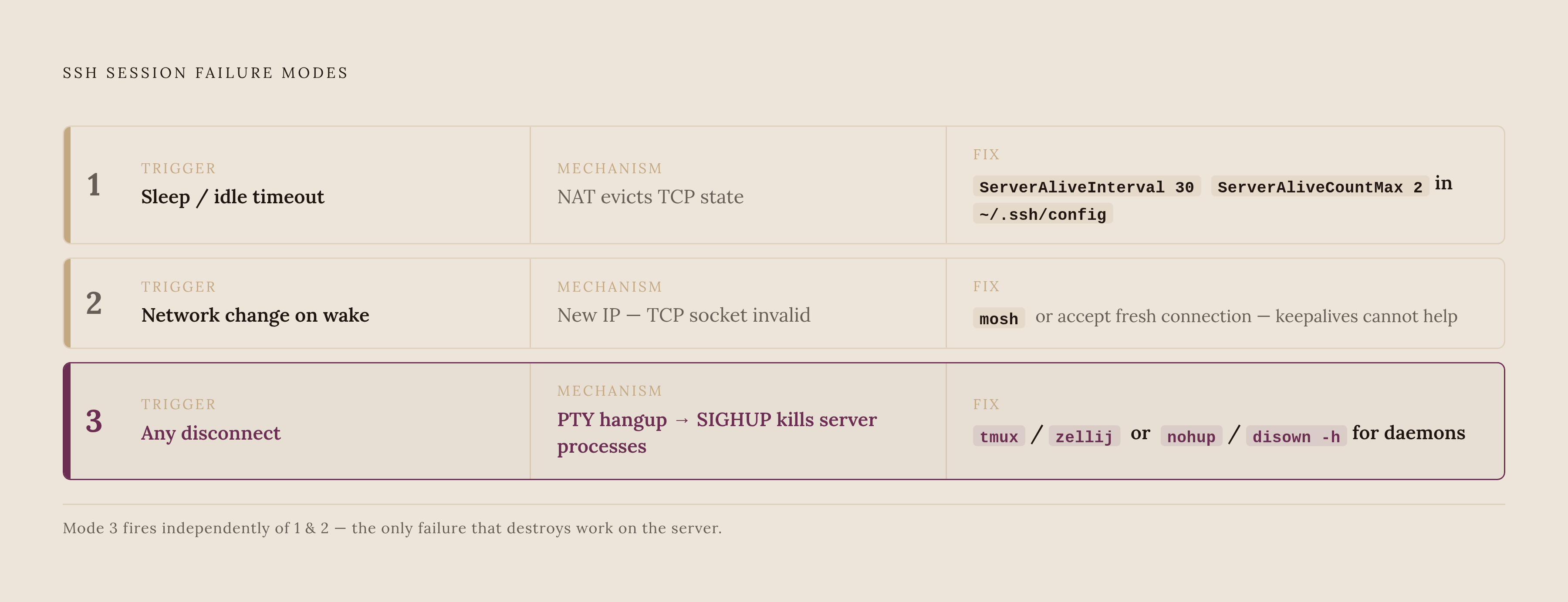
Because the three failure modes operate at different layers, the three fixes operate at different layers too, and none of them substitutes for the others. Keepalives address NAT eviction. Terminal multiplexers address process survival. Signal shielding addresses a narrower category of process-level exposure. A setup that handles only one of the three still leaves the other two live.
For NAT eviction, the fix is an application-layer keepalive. Adding ServerAliveInterval 30 and ServerAliveCountMax 2 to ~/.ssh/config tells the SSH client to send a probe through the encrypted channel every 30 seconds and to end the session after two consecutive failures, so a dead connection surfaces in roughly a minute.
For process survival, the fix is a terminal multiplexer running on the remote server, not on the laptop. Tools like tmux and Zellij run as independent server processes on the remote host; SSH is simply the mechanism by which a terminal attaches to them. When the SSH connection dies, the multiplexer server doesn't notice, because it was never depending on that connection to keep running. Testing documented in a 2026 post made the contrast concrete: a process named claude, started outside a multiplexer, was gone within three seconds every time the SSH connection was cut. The same process started inside tmux completed all three test runs without interruption. A separate case from the Eclipse Adoptium project, during Google Summer of Code 2025, showed the same pattern: an SSH connection to a VM, interrupted by a closed laptop lid, terminated a training process that was running directly in the shell, and the documented fix was to run it inside tmux instead. As of September 2026, tmux is version 3.7c and Zellij is 0.45.1. GNU Screen, at version 5.0.0 since its August 2024 release, still uses a single-socket-per-session model that offers durable persistence without the native session grouping that tmux and Zellij provide. An emerging pattern in 2026 involves developers running long AI coding agent tasks inside tmux, closing the laptop, and reconnecting hours later from an entirely different machine. Both tmux and Zellij handle that case cleanly, because the process they're holding open runs independently of whether the laptop stays awake.
For a narrower case, specific daemonized processes that can't practically run inside a multiplexer, the fix is signal shielding at the process level. The nohup command tells a process to ignore SIGHUP outright, though only processes built to respect that instruction will actually survive the session ending. The disown -h command takes a different approach: it leaves the job in the shell's active job table but marks it so the shell doesn't forward SIGHUP to it when the session closes. For daemons specifically, the more correct fix sits a level lower: calling setsid() in the pre-exec step of the spawning command detaches the daemon from any controlling terminal and removes it from any foreground process group, so the hangup signal has no path to reach it. One constraint matters here and gets missed often enough to cause new problems: a daemon that itself manages PTY children should not have SIGHUP set to SIG_IGN, because that disposition is inherited across exec by those children, which defeats the hangup that's supposed to reap them when the daemon itself dies.
For most setups, keepalives plus a multiplexer cover the overwhelming majority of cases. Signal shielding is a tool for the specific situation where a process must run as a daemon and can't be wrapped in a multiplexer session.
When a different transport removes the connection-layer problem
Mosh takes a different approach to modes one and two by not identifying a session through a TCP address-pair. Because a Mosh session isn't tied to a fixed four-tuple, it survives sleep, it survives roaming between networks, and it survives IP address changes that would immediately kill a standard SSH connection. Mosh keeps the session intact when the client's endpoint changes to a different address and when the client goes to sleep entirely, precisely the two scenarios where SSH runs into a TCP timeout and gives up.
Mosh does not touch mode three, doing nothing to prevent the SIGHUP cascade that reaches server-side processes when a session ends, so most people running Mosh pair it with a multiplexer, with Mosh handling the connection layer and the multiplexer handling process survival.
Mosh carries trade-offs that keep it from being a universal replacement for SSH plus keepalives. It requires installation on the server side, which is a real obstacle on locked-down or shared hosts where a user may not have the ability to install new software. It requires a range of UDP ports to be open through any firewall in the path, a requirement that standard SSH doesn't impose. It also lacks native scrollback, a feature SSH terminal users often take for granted. One source, Spoken Like a Geek, recommends Mosh specifically for users who close their laptops often or move between networks frequently, treating it as the transport-layer answer for exactly the cases where keepalives can't help because there's no connection left to keep alive. Mosh is a different tool solving a different part of the problem than the multiplexer layer or SSH with keepalives, with its own installation and firewall costs attached.
Diagnosing which failure mode is happening before reaching for a fix
Because all three failure modes produce the same frozen-terminal, broken-pipe symptom, the useful diagnostic signal is the timing of the failure and what else changed around it.
A session that dies after sitting idle for a long stretch, with no network change involved, points to NAT eviction. Keepalives configured through ServerAliveInterval will fix this case directly.
A session that dies the instant the laptop wakes, where the network also changed, whether that's a switch from Wi-Fi to cellular, a VPN reconnecting, or a move to a different access point, points to mode two. Keepalives will not help here under any configuration, because the connection's identity has already changed. Mosh, or simply accepting that a fresh connection is needed, is the right response.
A session where processes on the remote server die when the connection drops, even a connection that drops only briefly, points to mode three, regardless of which of the first two modes caused that drop. A multiplexer or targeted signal shielding is what's needed here, independent of whatever fix addresses the connection layer.
The VS Code Remote-SSH case from January 2026 adds a layer worth checking before assuming the problem sits in the network at all: an application-layer client can impose its own disconnection behavior on top of the underlying TCP state, so the same sleep and wake cycle that leaves a native terminal connected can still drop a different client running on the same machine.
For a session that has already frozen and needs to end immediately rather than wait out a TCP timeout, SSH has a built-in escape hatch: pressing Enter and then typing ~. disconnects the session right away. It isn't a fix for any of the three failure modes, but it spares the wait for the timeout to expire on its own.
Sources
- [PATCH] tty:pty: move wake_up*() after tty_vhangup() in pty_close()
Provided the kernel-level detail on how closing the PTY master triggers pty_close() and tty_vhangup(), which send SIGHUP and SIGCONT to the session leader.
- pty master close and SIGHUP
Documented the mechanism by which the shell resends SIGHUP to its child jobs when the PTY master closes, supporting the description of the full signal chain.