Linux Inhibit Locks for Unattended Agent Jobs
Protect long-running Linux jobs from sleep with systemd-inhibit locks and the right configuration.

Linux inhibit locks protect unattended agent jobs from sleep and shutdown, but launching systemd-inhibit is not enough. Reliable protection requires the right scope, a block lock tied to the job’s lifetime, and positive evidence that acquisition succeeded. The lock is cleaned up when its holder exits, and best-effort fallback lets agent code run on other systems when inhibition is unavailable.
Why unattended Linux jobs lose their work to OS sleep
The vortex-cfd project lost a multi-hour pimpleFoam run during the AA_010 remesh regression check on 2026-10-13 because the desktop went to sleep. The simulation software was not the cause. Investigation found caffeine running in the KDE/Wayland session, yet systemd-inhibit --list showed only NetworkManager, PowerDevil, and the screen locker, with no entry for caffeine. The apparent safeguard had acquired no logind inhibitor. The general lesson for unattended software is that neither the desktop environment nor the user can be relied on to keep the machine awake throughout a long run. The job needs protection of its own.
What systemd-inhibit actually does and why it is the right tool
The systemd-inhibit man page defines the tool as executing a program with a shutdown, sleep, or idle inhibitor lock taken. Its command-line wrapper acquires that lock before starting the command and holds it until the command finishes. The underlying mechanism is an open file descriptor. A single D-Bus call to org.freedesktop.login1.Manager.Inhibit(what, who, why, mode) asks logind for the lock and returns the descriptor that keeps it alive. Closing that descriptor releases the inhibitor.
When the holder exits or crashes, the kernel closes its file descriptor, so in the normal path there is no need for a stale-lock database or a separate unlock operation. A helper that stays alive can still retain its lock, which is a process-lifecycle problem. Because systemd-logind controls power-state transitions on virtually all mainstream Linux distributions, this places the inhibitor at the relevant layer regardless of desktop environment or display protocol.
Choosing the right lock scope with --what=
The --what= flag selects which operations the lock inhibits. Its accepted values fall into two distinct groups. High-level operation locks, namely shutdown, sleep, and idle, gate power requests and logind’s idle policy. Low-level locks, including handle-power-key, handle-suspend-key, handle-hibernate-key, and handle-lid-switch, stop logind’s built-in hardware handlers so that a desktop environment can take over. They do not prevent systemctl suspend issued from a root shell, and they are not substitutes for a sleep inhibitor.
The man page gives idle:sleep:shutdown as the default when --what= is omitted. Screen locking is a separate requirement from suspend. On a Sway/NixOS session, including idle was observed to block swayidle entirely, preventing both screen locking and DPMS. That is a security regression on a shared or portable machine, even when keeping the computation running is the intended outcome.
The session-desktop project made the same scope error when it mapped prevent-app-suspension to --what=idle. That choice blocked the entire idle pipeline, including the screensaver, lock screen, and DPMS. The fix changed the scope to --what=sleep. For unattended agent jobs, the practical choice is therefore explicit --what=sleep:shutdown, which targets suspension and reboot without deliberately suppressing screen locking. Adding idle is appropriate only when the job itself requires screen-lock suppression, and that decision should be documented.
Choosing between block and delay modes
The default block mode prohibits the selected operations without a time limit, whereas delay postpones them only up to InhibitDelayMaxSec= in logind.conf, whose default is 5 seconds. After that interval, the operation proceeds despite the delay lock. Delay is valid only for sleep and shutdown, and its intended role is a save-state hook that gives an application time to flush state without allowing it to prevent suspend indefinitely. Its smaller impact makes it easier to obtain, but also makes it unsuitable for protecting a multi-hour job. The appropriate mode for that job is --mode=block. Even then, inhibitors are a cooperation protocol rather than a security boundary, and a privileged user can override the lock to force sleep or shutdown.
Three practical patterns for acquiring a lock in agent code
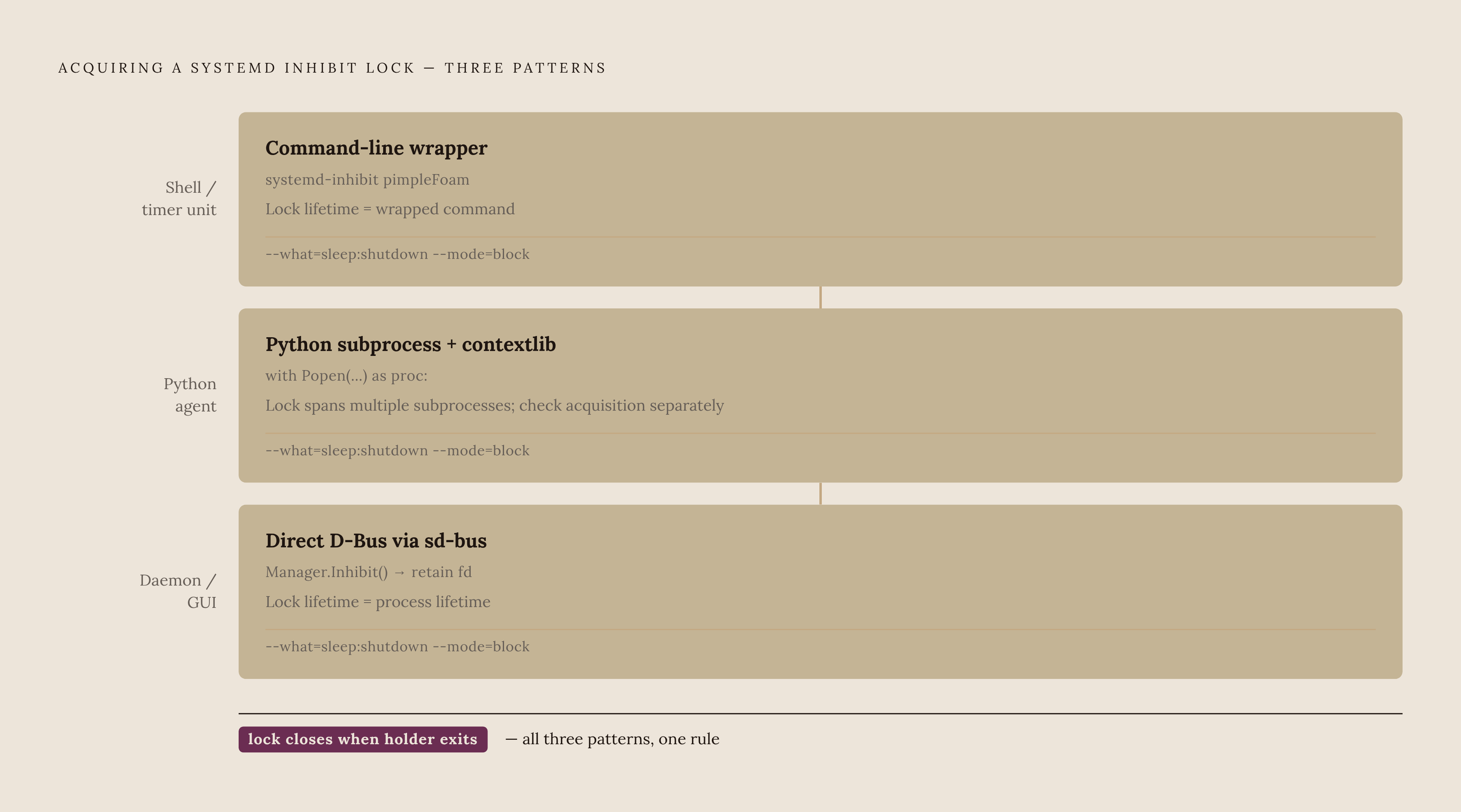
The simplest way to take a lock is with a command-line wrapper. For a pimpleFoam run, the invocation is systemd-inhibit --what=sleep:shutdown --who="agent-job" --why="long run in progress" --mode=block pimpleFoam. The inhibitor lasts for exactly as long as the wrapped command runs, and the simulation needs no code to manage the lock. This fits shell-scripted pipelines and systemd timer units whose job is a single subprocess. The --who= and --why= values also give the resulting lock a readable identity and purpose when it is inspected.
A Python agent may need a longer ownership interval. If it orchestrates several subprocesses, a lock around only one command does not span the whole pipeline. The corresponding pattern uses a subprocess.Popen child managed through contextlib, with the lock held throughout the with block and the child released on normal exit or exception. The vortex-cfd proposal offered this approach as an alternative to a command-line wrapper around run_pipeline, covering its snappyHexMesh and pimpleFoam calls. In this design, the context manager sets how long the lock should be held, but a separate check is still needed to confirm acquisition.
Direct D-Bus acquisition provides the most integrated option. A daemon or GUI application that cannot wrap itself in an external process can call the Manager’s Inhibit method through sd-bus, libsystemd, or a language binding and retain the returned descriptor. The job’s lifetime then determines when that descriptor closes. The zeta-daw project illustrates integrated inhibition through systemd’s sd-bus library, holding a freedesktop screen-saver inhibit while zd runs and during its tests/audio_evidence.sh batch. That example shows how to use inhibition through a library, but leaves the sleep-and-shutdown scope an agent needs to be set.
All three approaches depend on the same ownership rule. For portability, the policy is best-effort acquisition rather than making inhibition a prerequisite for useful work. If systemd-inhibit is unavailable, or the lock cannot be taken, the agent should log a clear warning and continue. This fallback does not provide protection, so the warning must distinguish an unprotected job from one whose inhibitor was acquired successfully.
Verifying that a lock is actually held, not just started
A launched process is not evidence of acquisition. systemd-inhibit can start, fail, and exit while the agent continues without the protection it expected. The primary inspection command is systemd-inhibit --list, which exposes active locks with their what, who, why, mode, UID, and PID fields. For the wrapper above, inspection should find the job’s identity with sleep:shutdown and block.
For programmatic monitoring, the logind Manager interface also exposes BlockInhibited and DelayInhibited. These properties encode currently active lock types as colon-joined strings. They do not identify the individual job holding them. A monitor needs the per-lock information in systemd-inhibit --list to distinguish the expected agent from another holder.
The caffeine incident demonstrates absence despite apparent activity, while NuvioDesktop demonstrates the opposite lifecycle error. During its AppImage update from 0.1.30-alpha to 0.1.31-alpha, a systemd-inhibit process remained running after the application exited. It kept a sleep:idle block lock and stopped suspend until it was manually killed. The descriptor model had not failed in that case. Its holder was still alive, so active inspection was needed to expose an inhibitor that outlasted the application.
Telling a silent failure from a slow start in code
A short wait followed by a process-liveness check cannot establish that acquisition succeeded. The agent-kit keep_awake("linux") function had this exact defect. It counted an invocation as failed only if it exited within INHIBIT_GRACE = 0.5 s, so a slower failure could be mistaken for a held lock. A loaded computer could exceed that window, and macOS’s first run of a new executable was measured at 1.3 s. That measurement concerned executable startup, but it exposed the weakness of treating elapsed time as success.
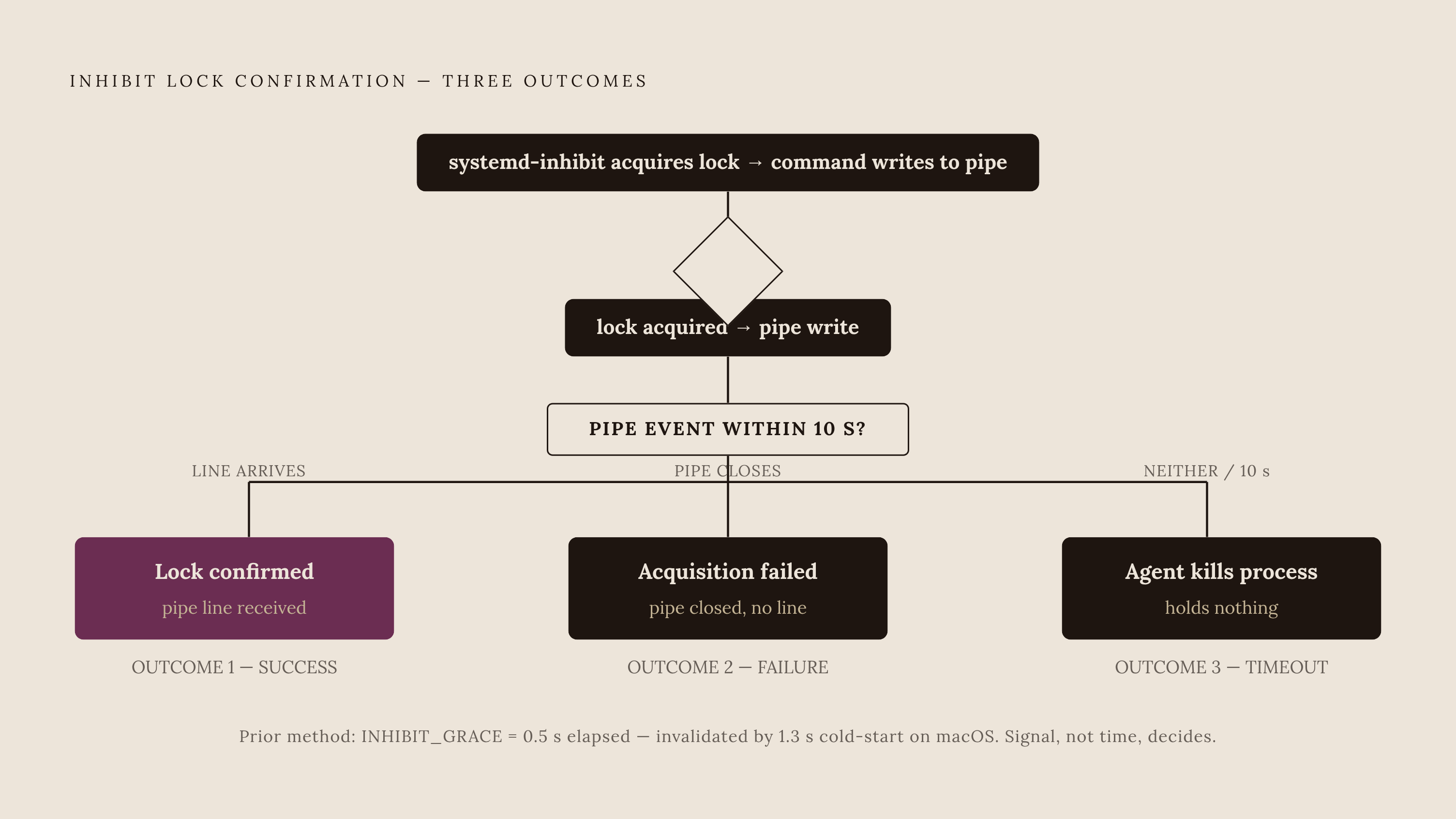
The fix uses the wrapper’s execution order as a handshake. systemd-inhibit starts its command only after acquiring the inhibitor, so that command can write a line to a pipe as its first action before becoming the long-running tail. The line is positive evidence of acquisition. Unlike an observation that the launcher remains alive, it comes from a point in execution that the launcher cannot reach without first holding the lock. This makes the command’s startup signal, rather than its startup speed, the decisive event.
The resulting decision has three possible outcomes. If the line arrives, the lock is held. If the pipe closes without that line, acquisition failed, no matter how long the invocation took to start. If neither event occurs within a bounded wait, the agent kills the process and treats it as holding nothing, using INHIBIT_WAIT = 10 s in the fix. The agent-kit PR implements this check and covers all three outcomes with named acceptance tests that pass on both fast and slow starts.
The incoming --signal= flag and what changes in systemd v263
An upstream pull request that has been merged adds --signal= so a job can respond when suspend is about to happen. It supports a checkpoint-and-yield pattern rather than requiring every job to block until completion. A job can catch the signal, save its state, and exit so that suspend can proceed. This suits work that can start again from a checkpoint but needs to keep its current state safe. It complements the block-lock pattern rather than replacing protection for workloads that need to finish uninterrupted.
The release context also includes a correction to delay-mode defaults. With --mode=delay, the default scope becomes sleep:shutdown, which matches the types logind accepts for delay locks. The signal flag is scheduled for systemd v263. It is not present in earlier releases, so agent jobs targeting currently deployed systems should not depend on it yet.
Putting it together: a minimal reliable inhibit pattern for agent jobs
For an unattended agent, the implementation starts with explicit --what=sleep:shutdown --mode=block, adding idle only for a documented requirement to suppress screen locking. Ownership should match the work being protected. A single-command job can use the wrapper, a Python pipeline can use a managed child, and an integrated application can retain the D-Bus descriptor directly. For a scheduled or overnight job in a systemd timer unit, the durable form is to wrap ExecStart= with systemd-inhibit in the unit file. Acquisition remains best-effort, with a warning and continued execution when the tool or lock is unavailable.
When using a subprocess, the wrapped command should send a signal on a pipe to confirm acquisition before it starts its long-running work. A pipe that closes without the signal means failure, while a bounded wait with no result means the invocation must be killed and treated as unprotected. After launch, the final operational check is systemd-inhibit --list, confirming the job’s entry with the expected who, what, and mode values before leaving the machine unattended.
Sources
- systemd-inhibit - Execute a program with an inhibition lock taken at Linux.org
Cited directly as the source defining systemd-inhibit as a tool that executes a program with a shutdown, sleep, or idle inhibitor lock taken.
- Inhibitor Locks
Provided the technical details on the D-Bus Inhibit method, the BlockInhibited and DelayInhibited properties, and the inhibitor lock mechanism used throughout the article.
- systemd-inhibit
Provided authoritative details on --what= flag values, default scope, --mode= options, InhibitDelayMaxSec, and the incoming --signal= flag for systemd v263.