Running Coding Agents on EC2 Without a Local Machine
Moving agents to EC2 frees your laptop but adds ops choices.
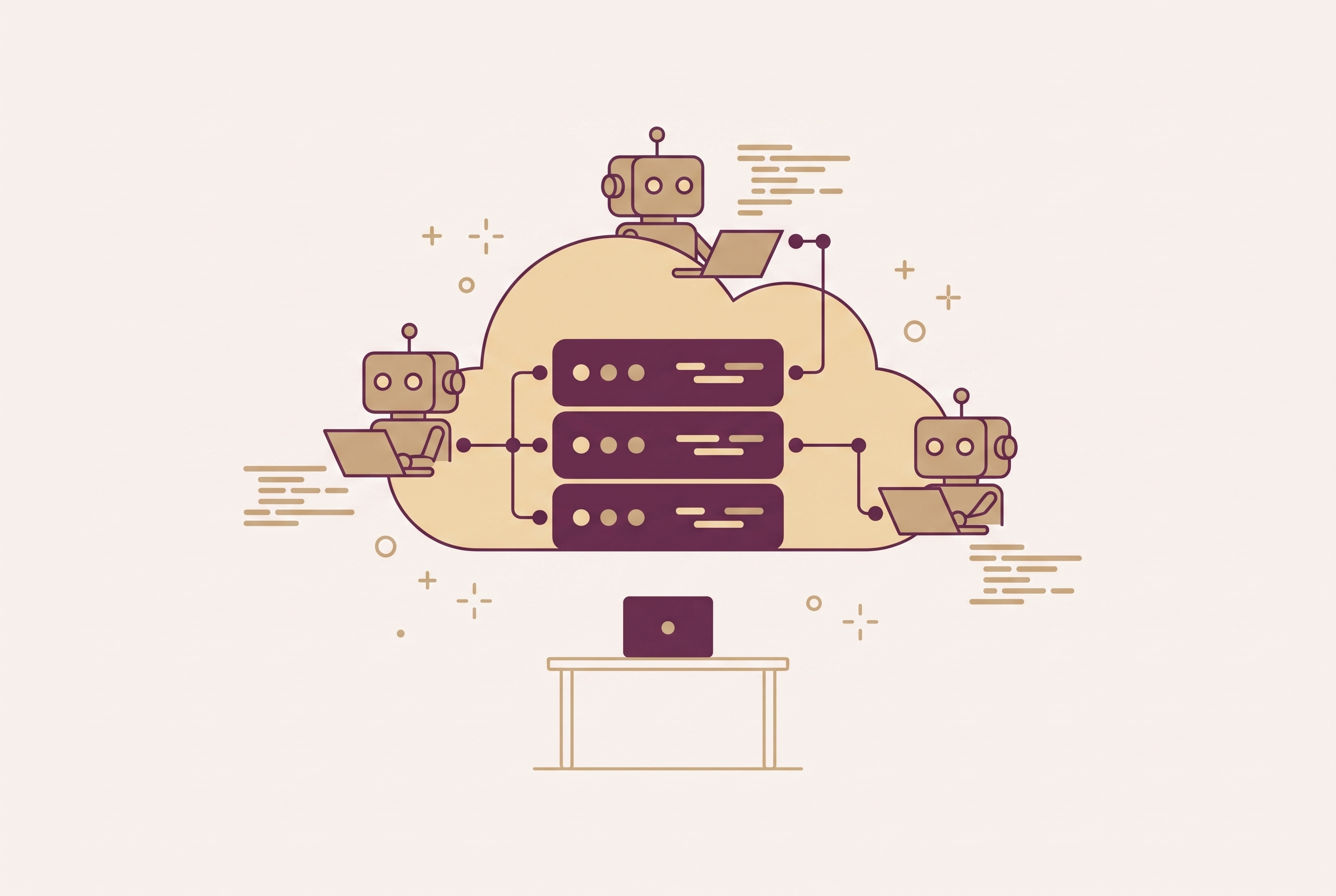
Running coding agents on EC2 removes the laptop from the execution path, but reliable execution still requires deliberate choices about access, credentials, idle shutdown, and isolation. Those choices decide whether work keeps going when a developer disconnects and whether parallel tasks stay separate. The options range from a single self-managed instance to managed environments in the team’s own AWS account. The right fit depends on how long sessions last, how big the team is, and who runs the infrastructure.
Why the laptop is the wrong home for a coding agent
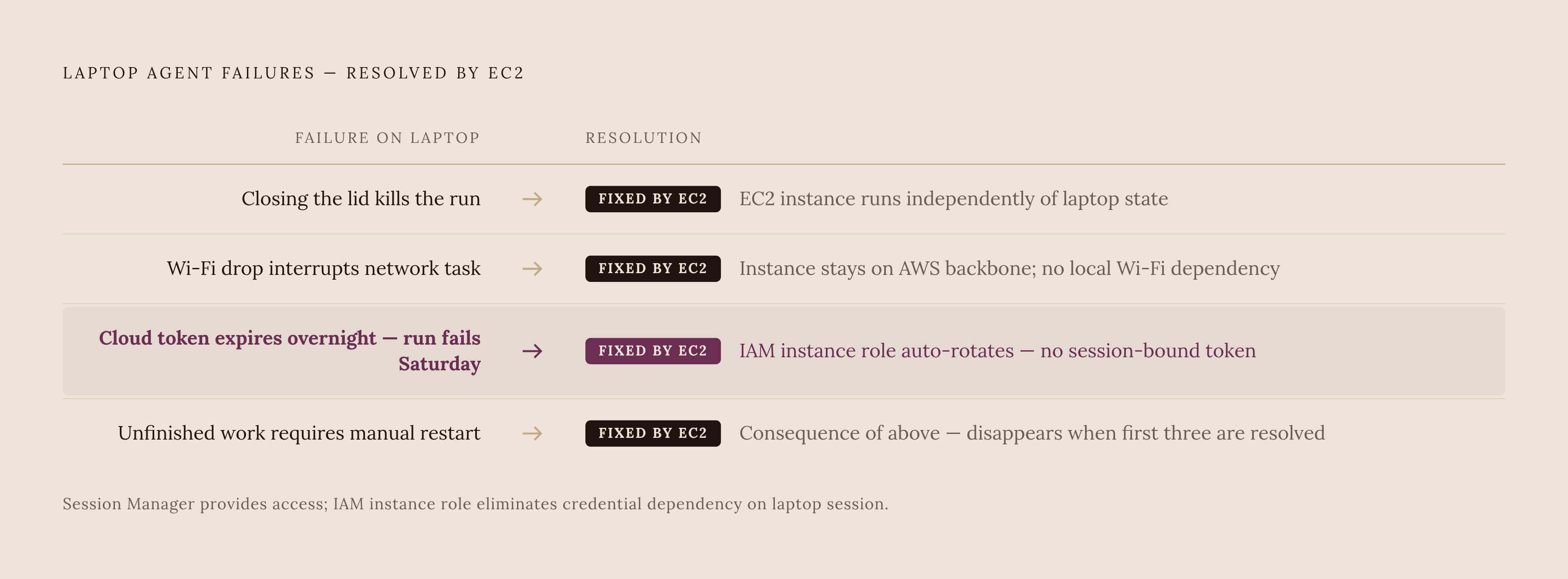
Coding agents work for hours or days, but laptops sleep, lose Wi-Fi, and rely on cloud tokens that can expire during a run. Any of those interruptions can leave an unfinished unit of work that the developer must restart. The code itself may be coming along just fine. A bolt started Friday can still fail overnight because its cloud token expires, and work that needs network access can stop when Wi-Fi drops.
These failures make the developer’s machine an execution dependency. Moving the agent to EC2 breaks that dependency when connectivity and credentials are configured correctly. The agent can keep working after the developer disconnects. However, the move introduces operational decisions that a laptop-based workflow may have left implicit, including who manages access and what happens when the agent finishes.
What moving to EC2 actually fixes & doesn't
A fresh EC2 instance is a reasonable home for a coding agent because the agent is a Unix process that reads files, executes bash, and starts other processes. The change is in the infrastructure around that process. An attached IAM instance role gives the agent credentials that rotate automatically, while private networking lets it reach RDS and internal APIs without opening those services to the internet.
That foundation does not make the instance self-managing. EC2 does not automatically separate tasks sharing a machine, stop compute when work ends, or configure access for a team. Patching also needs an owner. These responsibilities distinguish moving a process off a laptop from providing a reliable environment for it, and they remain with the team unless a managed service takes them over.
Launching & connecting without exposing ports
AWS Systems Manager Session Manager is the recommended way to connect to a self-managed instance. It eliminates inbound ports and SSH key distribution. The launch command, aws ec2 run-instances, attaches an IAM instance profile, selects a subnet, and assigns a name tag. A t3.xlarge is a working starting point, with the subnet selected according to the VPC topology.
Session Manager needs the AmazonSSMManagedInstanceCore managed policy on the instance role. Connecting this way needs no public IP or open inbound security group rule. The port-forwarding command pattern is aws ssm start-session --target INSTANCE_ID --document-name AWS-StartPortForwardingSession --parameters 'portNumber=["REMOTE_PORT"],localPortNumber=["LOCAL_PORT"]'. Once connected, the baseline tooling includes Git, tmux, Node.js, the AWS CLI, and the agent CLI. The role also holds the permissions for Bedrock and self-stop, providing one place to audit the AWS capabilities available on the machine.
Giving agents credentials that never expire mid-run
An IAM instance role replaces manually refreshed cloud credentials with automatically rotating credentials delivered through the instance metadata service. Authentication no longer depends on a developer refreshing a token. A bolt started Friday can therefore still be authenticated on Monday. The credentials still expire, but they rotate to keep a long-running agent authenticated.
For Claude Code on Bedrock, the environment needs CLAUDE_CODE_USE_BEDROCK=1, AWS_REGION, and ANTHROPIC_MODEL, with the model pointing to a cross-region inference profile. With the required Bedrock permissions, every shell can use the service without asking for an API key. Git tokens have a separate storage requirement. They belong in AWS Secrets Manager, retrieved at runtime with aws secretsmanager get-secret-value and limited to the repositories and operations the agent needs.
AWS’s control framework guidance calls for no wildcard ARNs, no hardcoded credentials, and no unrestricted inbound security group access. The instance role must follow least privilege. That review also extends to tools, because an MCP tool call exposes permissions available through its server. A server with broad permissions can therefore give the agent more access than its own environment appears to allow.
Stopping idle instances without killing running agents
An EC2 instance remains billable when no agent is working, but a disconnected developer does not prove that the instance is idle. Work that takes a long time may keep going with no terminal open. The self-managed setup uses a systemd timer to check whether an agent is working and read CPU load through /proc/loadavg, treating the machine as busy when the load is above a threshold.
The reverse path belongs on the developer’s machine. A launcher starts the instance if it is stopped, waits for SSM availability, and opens the port-forward, making reconnection a double-click. Without that pairing, stopping unused compute addresses the bill while leaving the developer to reconstruct the connection each time work resumes.
Why isolation breaks down when running more than one agent
Parallel agents on one instance share more than the repositories they edit. Git worktrees separate branches on disk, but they do not separate home directories, SSH keys, or AWS credentials. A repository boundary is not a security boundary. Worktrees and Linux users alone therefore do not provide complete task isolation.
A broad shared instance role amplifies this exposure because its permissions are available across tasks on the machine. A compromised agent can reach other working directories. Giving each task its own EC2 instance stops that credential bleed. However, it also multiplies the operational work associated with provisioning, access, patching, and lifecycle management.
What AgentCore Runtime Instances add on top of raw EC2
Amazon Bedrock AgentCore Runtime Instances run agents on EC2 in the customer’s own account while AWS handles provisioning, patching, scaling, and lifecycle management. The customer retains the account boundary. This shifts infrastructure operations to AWS without moving the underlying compute into a separate provider account. It addresses the management burden that grows when tasks need distinct execution environments.
Runtime instances support sessions up to 14 days and offer GPU-accelerated, memory-optimized, and compute-optimized instance types. The price includes the EC2 instance and a fee to manage it. Teams can use Savings Plans, Reserved Instances, and On-Demand Capacity Reservations for that compute. AWS added runtime instances on November 16, 2026, in six more regions, including US West (N. California), Canada (Central), Europe (London), Europe (Paris), Europe (Stockholm), and Asia Pacific (Seoul). Regional requirements therefore belong in the selection decision alongside instance resources.
AgentCore Runtime v2: snapshot restore, auto-scaling, & idle scale-to-zero
AgentCore Runtime v2 became the default on November 12, 2026, adding snapshot-based session restore, compute and memory scaling, and idle scale-to-zero. Snapshot restore removes initialization from the new-session path. That changes how sessions start rather than requiring each new session to pass through initialization. Compute and memory scaling address heavier workloads, while idle scale-to-zero automates cost control that otherwise needs a self-managed shutdown mechanism.
Each session still runs in its own hardware-isolated Firecracker microVM. These features address distinct concerns, including startup work, resource demand, idle cost, and separation between sessions.
Hardware-enforced isolation for agent fleets: Nitro Sandboxes on EKS
AWS Nitro Sandboxes on EKS, announced November 9, 2026, address isolation for teams running agent fleets on Kubernetes. Each agent pod gets a hardware-enforced boundary that matches what a dedicated EC2 instance has, using the same Nitro System that isolates EC2 instances. An agent that has been compromised cannot get to another pod’s credentials or filesystem. The pod remains the team’s operational unit.
Previously, teams mainly used Fargate or dedicated node groups for these multi-tenant workloads, whereas Nitro Sandboxes bring equivalent isolation to standard EKS node groups. Teams can retain Kubernetes without provisioning a separate VM for every task. For an existing EKS fleet, the benefit is therefore not a new developer-access workflow but an isolation boundary that fits the infrastructure model already in use.
Running agents in your AWS account with Northflank Cloud Harnesses
Northflank Cloud Harnesses address developer access as well as execution. Through bring your own cloud, or BYOC, they deploy isolated coding environments into the customer’s AWS, GCP, Azure, Oracle, or CoreWeave account. Each environment includes microVM isolation, compute, networking, credentials, a web terminal, and SSH access, with configurable persistence. Teams can create multiple Harnesses for parallel tasks and pause them when not needed.
Supported agents include Claude Code, Codex, Cursor, OpenCode, and Pi, with a bring-your-own-agent path also available. Team members connect through Northflank accounts rather than requiring direct instance access for each developer. This shifts the access model above individual machines. It gives teams a shared way into separate coding environments without requiring them to build that platform layer themselves.
On AWS, BYOC keeps compute in the customer’s account. IAM controls AWS access, CloudTrail records AWS API calls, and compute appears in AWS cost reporting with other workloads. Setup consists of connecting the AWS account and creating Harnesses, while Northflank maintains the Harness platform layer. BYOC is not the only deployment option. Teams without an existing AWS footprint, or those that prefer not to configure BYOC, can use Northflank’s managed cloud instead.
Choosing the right path given session length, team size, and isolation needs
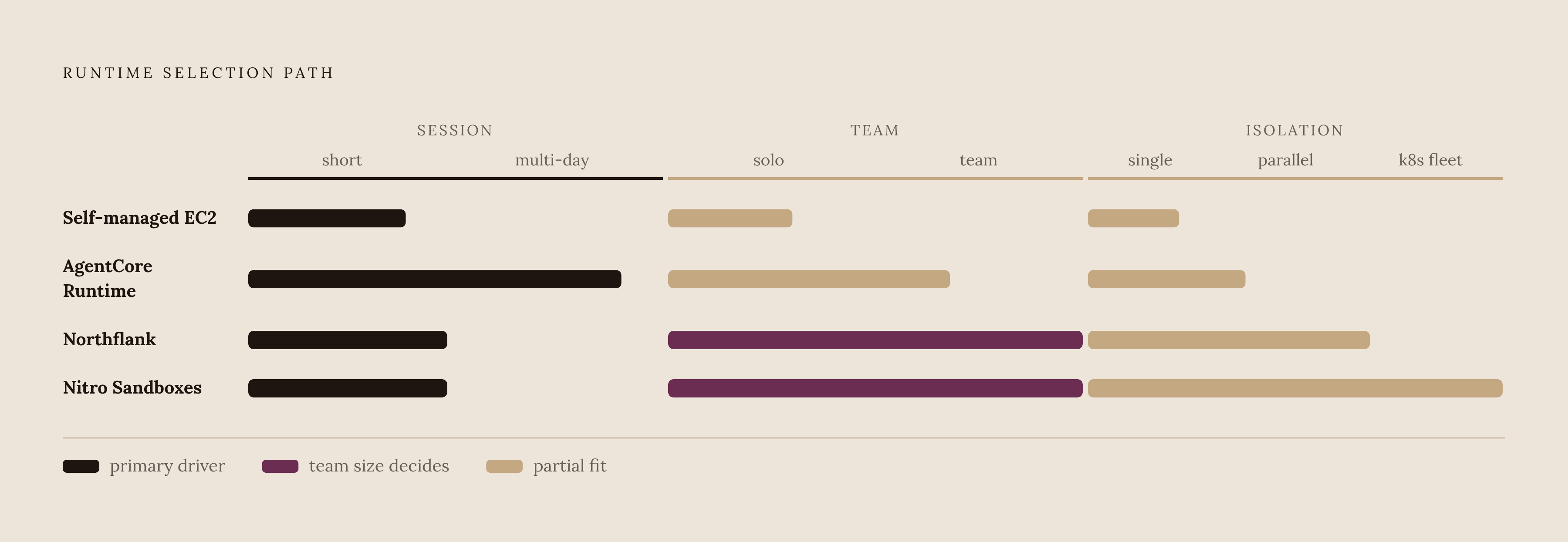
For a solo developer running one agent in short sessions, self-managed EC2 is a reasonable fit. Its suitability depends on accepting responsibility for connectivity, credentials, idle shutdown, and patching. AgentCore runtime instances are a better fit when work takes days, since they support sessions up to 14 days. The v2 features also help with session startup and idle compute, but the choice still depends on which regions the team needs.
Team size changes the access and isolation requirements. For parallel agents in an existing AWS account, Northflank provides isolated environments and shared access without the team building the platform layer. Runtime instances are another fit for teams invested in the Bedrock ecosystem. For fleets already on Kubernetes that require multi-tenant hardware isolation, Nitro Sandboxes provide that boundary within EKS.
Across these paths, least-privilege IAM, narrowly scoped Git tokens in Secrets Manager, no hardcoded credentials, and no unrestricted inbound rules remain required. The team must decide which responsibilities to retain and which to delegate. Removing the laptop is the starting point for building reliability.
Sources
- ICYMI: What landed for AI builders in August 2026
Supplied details on AgentCore Runtime Instances, including 14-day sessions and the available instance types.
- Let Your AI-DLC Agent Run to Completion on EC2
Supplied the self-managed EC2 setup: Session Manager access, instance-role credentials, idle shutdown, and the isolation limits of shared instances.